CSS
input text 삭제 버튼을 css로 구현하기
by yoora · 2025-12-28
- 목차 -
input 필드의 삭제 버튼 노출을 Javascript로 제어하는 경우가 많은 것 같습니다.
디자인 요소로 인해 JS의 제어가 꼭 필요한 경우가 아닌 기본 유형의 input 필드의 삭제 버튼은 CSS로 간단하게 구현할 수 있습니다.
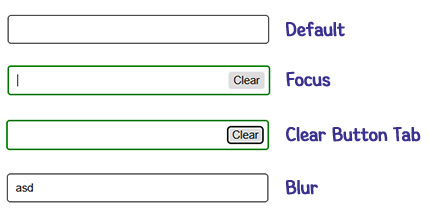
동작 조건
input focus
삭제 버튼 노출
삭제 버튼 focus 상태 (tab focus)
input focus 유지
input focus out
삭제 버튼 미노출
HTML 구조
예시HTML<div class="input_area">
  <div class="input_box">
    <input type="text" value="" class="input"/>
    <button type="button" class="btn_delete">Clear</button>
  </div>
</div>
CSS 코드
예시CSS
/* 요소 스타일 */
*{margin:0;padding:0}
body{width:100%;height:100vh;display:flex;
justify-content:center;align-items:center;}
input, button {border:0;background-color:transparent;}
.input_area{width:300px}
.input_box {width:100%;display:flex;border-radius:4px;
padding:5px 5px 5px 10px;justify-content:space-between;
border:1px solid #000;}
.input {line-height:22px;width:calc(100% - 42px);outline:none;}

/* focus에 따른 버튼 노출 처리 */
.btn_delete{cursor:pointer;display:none;padding:0 5px;
border:1px solid #eee;border-radius:4px;margin-left:8px;}

.input_box:focus-within .input:not(:placeholder-shown) + .btn_delete {
  display:block;
}
:focus-within과 :placeholder-shown을 함께 사용하면 css로 삭제 버튼 노출 제어가 가능합니다.